> For the complete documentation index, see [llms.txt](https://docs.live-eo.com/tradeaware/llms.txt). Markdown versions of documentation pages are available by appending `.md` to page URLs; this page is available as [Markdown](https://docs.live-eo.com/tradeaware/using-the-tradeaware-web-app/settings-guide/webhooks-guide.md).
# Webhooks Guide
Webhooks push TradeAware events to your systems in real time, eliminating polling and exports. They enable instant information and automated workflows, with built-in retries and monitoring.
## :warning: Prerequisites
Webhooks is a premium feature in TradeAware. To use this functionality, your account must be enabled for this. If you do not have this enabled, contact your Customer Success Manager.
## Accessing Webhooks in the Web App
1. Click the **profile / settings icon** at the bottom‑left corner of the side‑bar and choose **Manage account**.
2. The *Manage account* page shows your personal & business details and a **Developer Tools** section.
3. Inside **Developer Tools** you will find two entries:
1. **API Access** – create or revoke access tokens.
2. **Webhooks** – configure event callbacks.
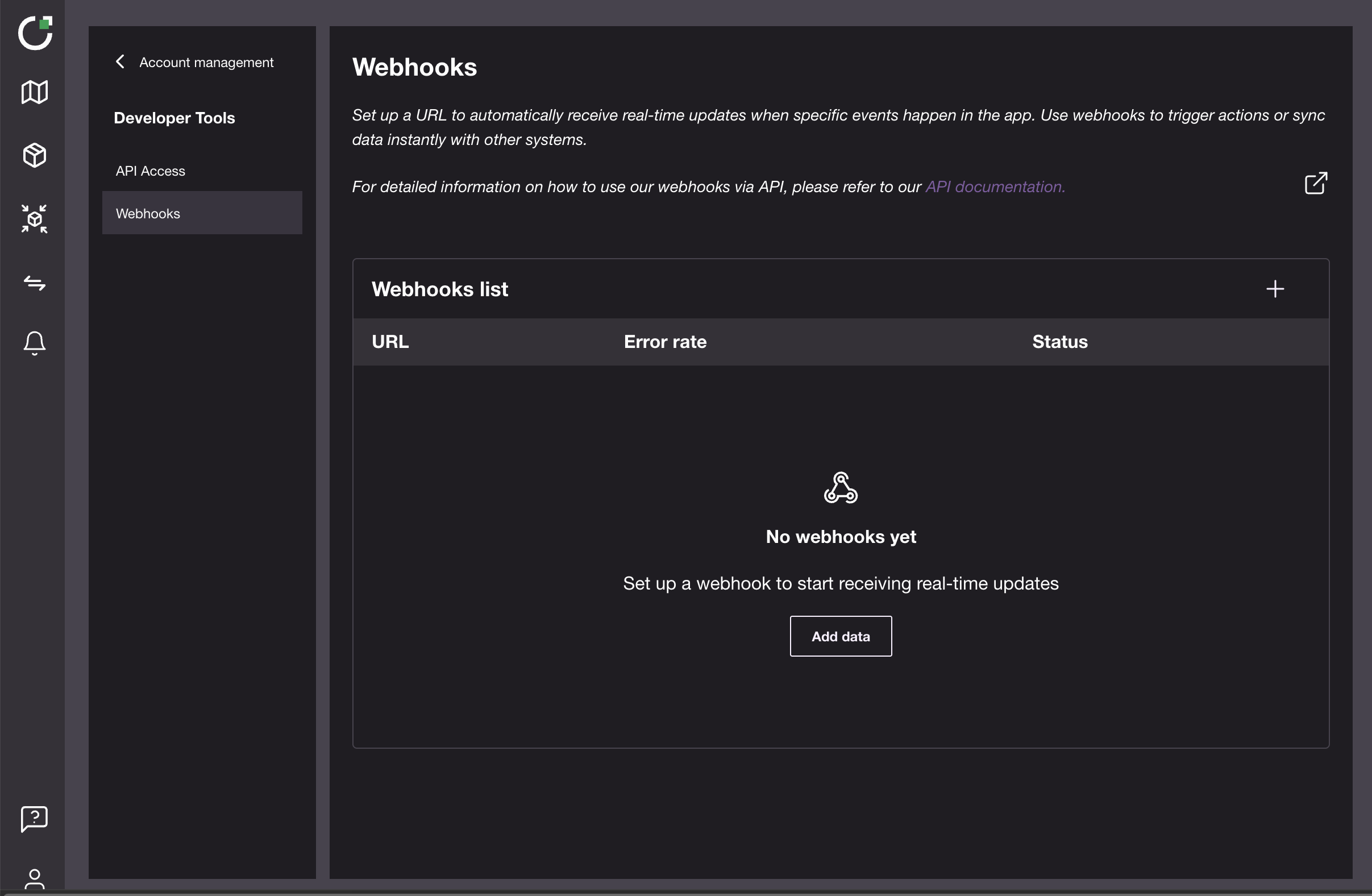
Selecting **Developer Tools → Webhooks** opens the page shown below.
Empty page
The Webhook page shows every webhook you’ve created:
* **URL** – the destination endpoint that will receive event payloads.
* **Error rate** – the percentage of recent deliveries that returned a non-2xx HTTP status (0 % means everything is healthy).
* **Status** – **Active** webhooks send events immediately; **Inactive** ones are paused but not deleted.
## Create a Webhook
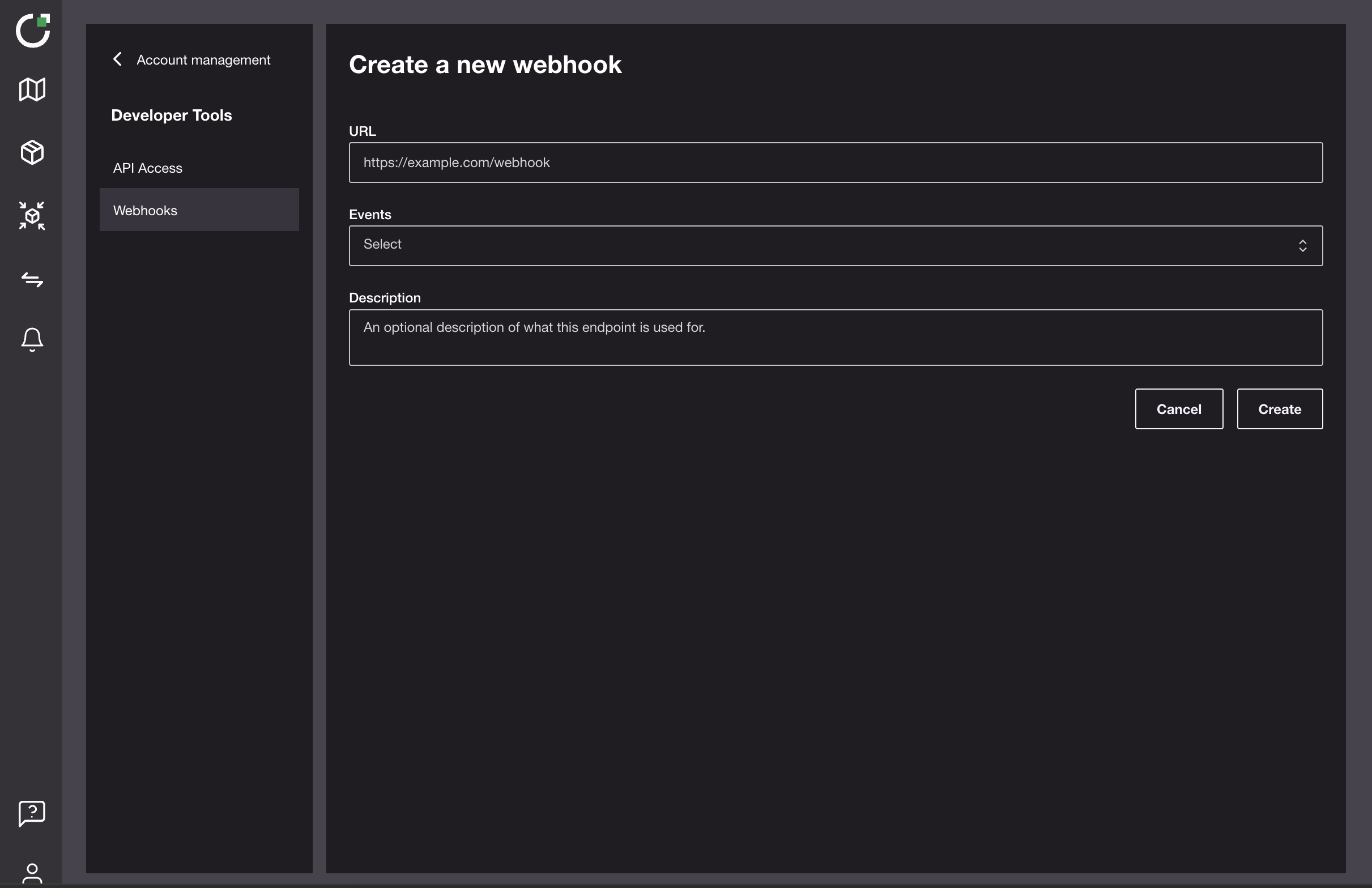
Click **Add data** or the **➕** button to open the creation form.
Create a new Webhook
Fill in three fields:
* **URL** – any public HTTPS endpoint that accepts `POST` requests (e.g. your own `https://api.example.com/webhooks`, or a testing service such as `https://webhook.site/abc123`).
* **Events** – choose one or more event types.
* **Description** – optional note such as “QA inbox”.
> `webhook.site` is shown only for quick testing. It is an external service not operated by LiveEO and may apply usage limits or paid plans. Use any HTTPS endpoint you control in production.
>
> Use tools like `webhook.site`, `ngrok`, or `RequestBin` for development. For production, use your own HTTPS endpoint and verify signatures (see [**Security**](https://docs.live-eo.com/tradeaware/using-the-tradeaware-api/webhooks-guide#security-best-practice-verify-webhook-payloads)).
Opening the **Events** dropdown shows the current set of event types:
## Key event types
#### `transaction.updated`
A message is sent every time a transaction moves to a new status.
* **DRAFT** – the transaction is still being edited and not yet queued.
* **TO\_SUBMIT** – ready to be sent to EU TRACES.
* **SUBMITTED** – delivered to TRACES, awaiting validation.
* **ERROR** - the transaction has been rejected by the EU Information System.
* **AVAILABLE** – accepted by TRACES and now carries reference and verification numbers.
> *Typical automation*: Notify an ERP system when a transaction reaches **AVAILABLE** so that a Reference and Verification number can be added to a transaction and it can be released.
**Sample Webhook Delivery:**
```
{
"data": {
"id": "2f6d68e0-c2ef-4ec3-9ca0-9b571cd10ead",
"status": "DRAFT"
},
"event": "transaction.updated",
"timestamp": "1970-01-01T00:00:00.000Z"
}
```
#### `business_invitation.updated`
Triggers whenever a buyer or supplier acts on a business invitation.
* **ACCEPTED** – other party accepted; access granted.
* **REJECTED** – other party declined.
* **CANCELLED** – sender cancelled the invitation.
> *Typical automation*: Post to Slack when an invite is **ACCEPTED** so your onboarding team can proceed.
**Sample Webhook Delivery:**
```
{
"businessConnectionId": "57616a16-5fa4-4aa5-b360-73aa0f96cd7a",
"businesssId": "a56814c4-32b8-41be-8c7b-06ad968dfwfa",
"customData": {},
"email": "test@example.com",
"id": "895a4fea-2abb-42d5-bf55-991769a9343a",
"status": "ACCEPTED"
}
```
#### `analysis.precision.updated`
Notifies you about the state of a TradeAware Precision deforestation analysis.
* **SUCCEEDED** – results are available (risk scores, deforestation %, overlap layer).
* **FAILED** – analysis could not complete.
> *Typical automation*: Notify sustainability teams when a high‑risk Precision result is **COMPLETED** so they can initiate supplier engagement.
**Sample Webhook Delivery:**
```
{
"analysedAt": "2025-07-06T12:34:56.789Z",
"createdAt": "2025-07-05T09:15:00.000Z",
"id": "abc123-analysis-id",
"plotId": "plot-xyz789",
"status": "SUCCEEDED",
"updatedAt": "2025-07-06T12:35:00.000Z",
"version": "v1.0.0"
}
```
**`supplier_risk_assessment.updated`**
Notifies you whenever a supplier risk assessment record changes (e.g. moves to `UNDER_REVIEW`, receives new notes, or has new attachments).
**Typical automation:** Trigger internal workflows when a supplier is flagged `UNDER_REVIEW` and share the linked supporting documents with the risk team.
**Sample Delivery:**
```json
{
"data": {
"attachments": [
{
"createdAt": "2025-09-18T11:46:04.361Z",
"fileSizeKb": 24.76,
"filename": "Palm_Oil_Shipping_Document.pdf",
"id": "d7b17334-52ea-4b5d-b38d-e7394f04feaa",
"updatedAt": "2025-09-18T11:46:07.780Z",
"uploadedByUserId": "auth0|673de8adbac59bbef1f7b4b8"
}
],
"createdAt": "2025-09-18T11:46:10.359Z",
"id": "00f54ebd-9af7-4d25-bbd0-39459466fa37",
"notes": "This is Under review!",
"status": "UNDER_REVIEW",
"supplierId": "2584106e-2e74-4041-b2fa-bc9a0669bf25",
"updatedAt": "2025-09-18T11:46:10.359Z"
},
"event": "supplier_risk_assessment.updated",
"timestamp": "2025-09-18T11:46:10.375Z"
}
```
***
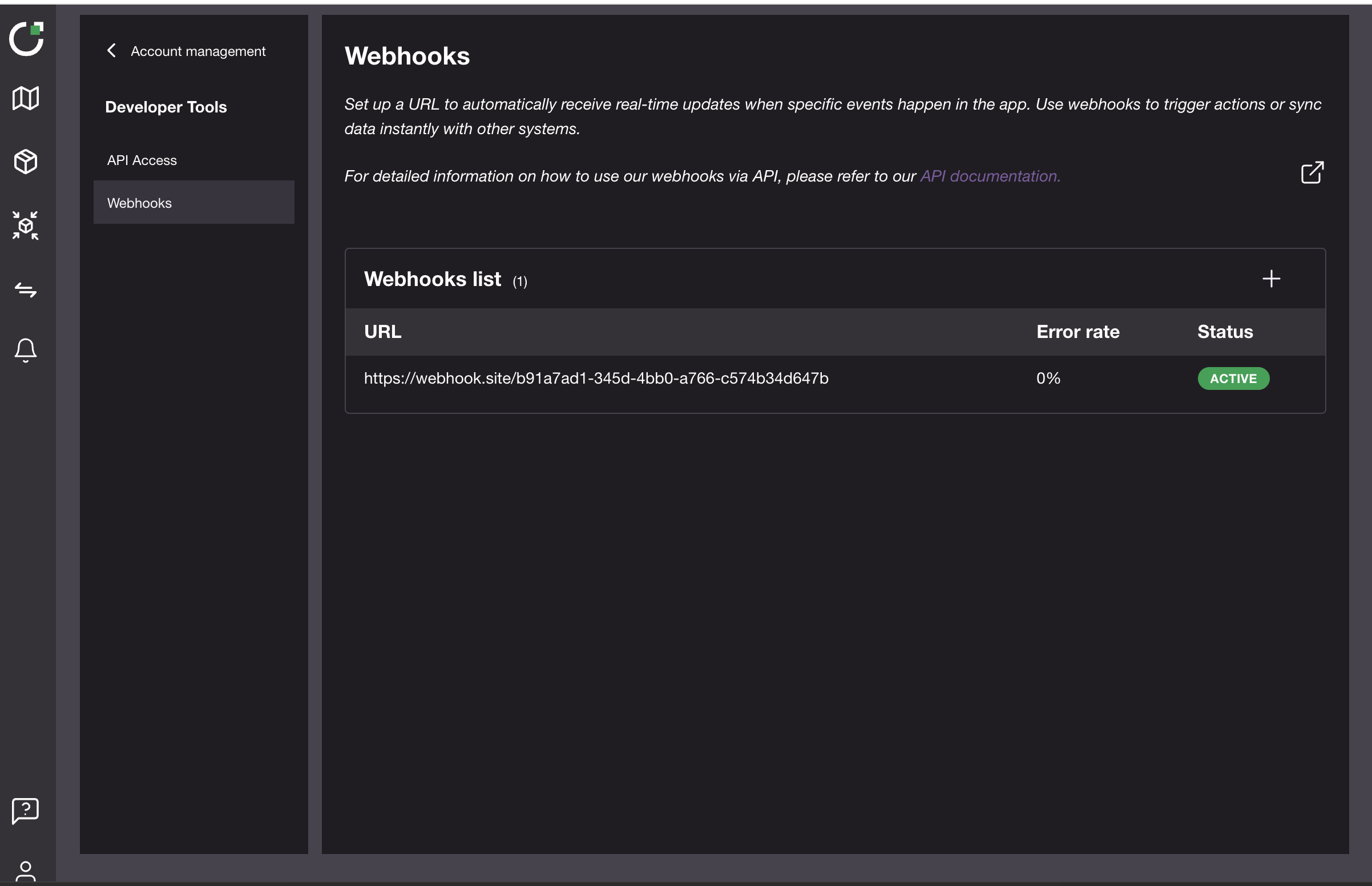
## Webhook list
The Webhook page shows every webhook you’ve created:
* **URL** – the destination endpoint that will receive event payloads.
* **Error rate** – the percentage of recent deliveries that returned a non-2xx HTTP status (0 % means everything is healthy).
* **Status** – **Active** webhooks send events immediately; **Inactive** ones are paused but kept for later.
Use the **➕** button to add a new webhook.\
Hover on any row and click **⁝** to edit settings, delete the webhook, or send a test message.
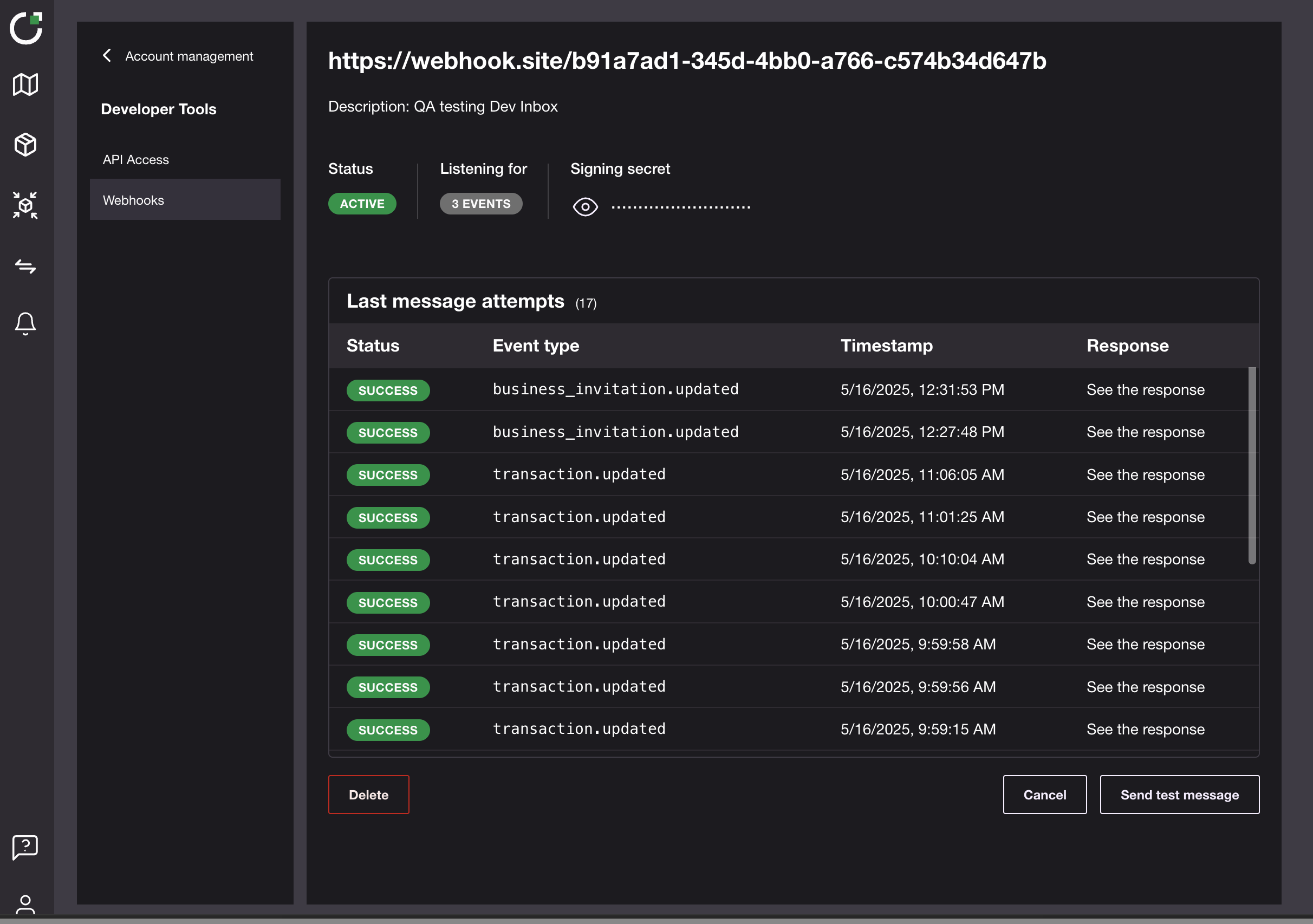
## Webhook details page
Webhook detail page
* Shows the full **URL** of the webhook and your optional **Description**.
* **Status** badge tells you if deliveries are *Active* or *Inactive*.
* **Listening for** displays how many event types the hook subscribes to; hover to see each one.
* Click the eye to copy the **Signing secret** for HMAC verification.
* **Last message attempts** lists the latest deliveries with status, event type, timestamp, and a *See the response* link for debugging.
* **Send test message** fires sample events on demand, great for QA.
* Use **Delete** to remove the webhook permanently or **Cancel** to return to the list without changes.
### Security Best Practice: Verify Webhook Payloads
These verification steps apply **no matter which endpoint provider you use** – self-hosted, cloud-function, or third-party.
To ensure the integrity and authenticity of incoming webhook data, it's crucial to verify the signature of each payload before processing it. TradeAware uses Svix to sign all webhook events.\
You can verify these signatures using one of two methods:
1. Using Official Svix Libraries: This is the recommended approach for most users. Svix provides client libraries for various programming languages that simplify the verification process.
2. Instructions & Examples:
3. Manual Verification: If you prefer or need to implement the verification logic yourself without a Svix library, you can follow their manual recipe.
4. Manual Instructions:
Always verify the `svix-id`, `svix-timestamp`, and `svix-signature` headers as described in the Svix documentation to protect against replay attacks and ensure the payload hasn't been tampered with.
## Frequently Asked Questions
* **Do I have to use** `webhook.site`**?**\
\&#xNAN;*No. It’s only an example*
* **Does the integration need a paid** `webhook.site` **plan?**\
\&#xNAN;*No. The free tier is fine for testing.*
* **What are the minimum requirements for my own endpoint?**\
\&#xNAN;*It must be publicly reachable via HTTPS, accept POST requests, return a 2xx on success, and verify the Svix signature.*
* **Can I use HTTP instead of HTTPS?**\
No. Webhooks require HTTPS for security.
* **What happens if my server is down?**\
TradeAware retries failed deliveries for up to 24 hours. Persistent failures raise the **Error rate** so that will you be aware this is happening.
* **How do I pause deliveries without deleting the hook?**\
Edit the webhook and toggle its status to **Inactive**.
* **Where can I see the full list of available events?**\
Either open the **Events** dropdown in the creation form or call `GET /webhooks/events` from the API.
* **What happens if my endpoint keeps failing?**\
If all attempts to a specific endpoint fail for a period of 5 days, the endpoint will be disabled. You'll have to re-add it to enable it again.
---
# Agent Instructions
This documentation is published with GitBook. GitBook is the documentation platform designed so that both humans and AI agents can read, navigate, and reason over technical content effectively. Learn more at gitbook.com.
## Querying This Documentation
If you need additional information that is not directly available in this page, you can query the documentation dynamically by asking a question.
Perform an HTTP GET request on the current page URL with the `ask` query parameter, and the optional `goal` query parameter:
```
GET https://docs.live-eo.com/tradeaware/using-the-tradeaware-web-app/settings-guide/webhooks-guide.md?ask=&goal=
```
`ask` is the immediate question: it should be specific, self-contained, and written in natural language.
`goal` is optional and describes the broader end goal you are ultimately trying to accomplish on behalf of the user. GitBook uses it to tailor the answer towards what is most useful for that goal.
The response will contain a direct answer to the question and relevant excerpts and sources from the documentation.
Use this mechanism when the answer is not explicitly present in the current page, you need clarification or additional context, or you want to retrieve related documentation sections.
 at the bottom‑left corner of the side‑bar and choose **Manage account**.
2. The *Manage account* page shows your personal & business details and a **Developer Tools** section.
3. Inside **Developer Tools**
at the bottom‑left corner of the side‑bar and choose **Manage account**.
2. The *Manage account* page shows your personal & business details and a **Developer Tools** section.
3. Inside **Developer Tools**  you will find two entries:
1. **API Access** – create or revoke access tokens.
2. **Webhooks** – configure event callbacks.
Selecting **Developer Tools → Webhooks** opens the page shown below.
you will find two entries:
1. **API Access** – create or revoke access tokens.
2. **Webhooks** – configure event callbacks.
Selecting **Developer Tools → Webhooks** opens the page shown below.